Claude Meetings: Anthropic's AI joins your Google Meet calls
On November 10, 2026, Anthropic announced Claude Meetings, a mode where Claude joins a video call as a visible participant. The product is in beta, limited to Team and Enterprise plans, and at launch it only works with Google Meet.
Key takeaways
- Claude Meetings is in beta, for Team and Enterprise plans. At launch, it only works with Google Meet.
- During the call, Claude can draft the plan being discussed, sketch a timeline and answer in the chat.
- It introduces itself as a participant and leaves the meeting if an outside guest joins.
- The announcement says nothing about recording retention.
What is Claude Meetings?
Until now, an AI assistant was mostly useful before or after a meeting: you paste in the notes, it spits out a summary. Claude Meetings does it during the call. You add Claude to the video call, it follows the conversation and starts working as soon as the discussion moves forward.
What changes is the output. During the meeting, Claude can produce the plan being discussed, draw it on a whiteboard with a timeline, and answer questions asked in the chat. It can also pull information from connected work apps, for example last year's numbers.
What it does, step by step
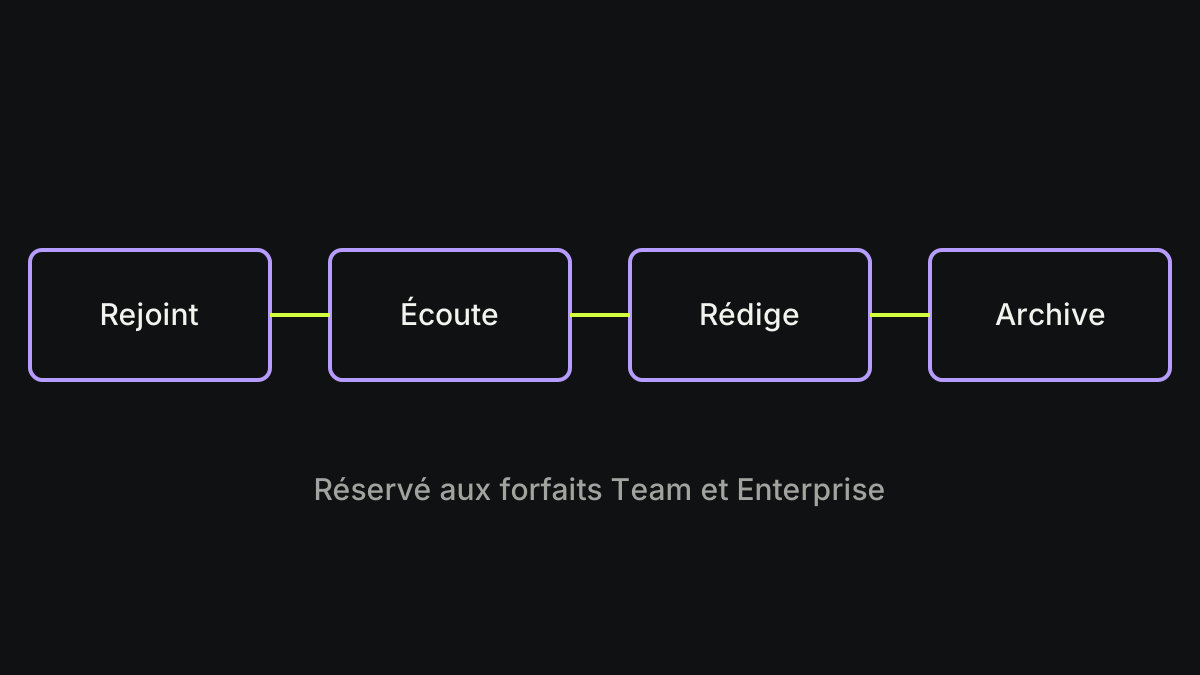
The diagram in the illustration follows the announced flow, as described by TechCrunch:
- It joins the call as a visible participant.
- It listens, and starts working during the meeting.
- It drafts the plan, sketches the timeline and answers in the chat.
- After the call, the notes, action items and documents are available in claude.ai.
What it won't do in a meeting
Anthropic has built in a few guardrails:
- It won't join a meeting that includes outside guests without an admin's approval.
- If an outside guest joins while it's there, it leaves the meeting.
- It identifies itself as a participant and posts a notice in the meeting chat.
Recordings: where do they go?
The announcement is vague on this point. TechCrunch doesn't detail how recordings are handled or how long data is kept. The only safeguards mentioned are Claude identifying itself, the notice in the chat and admin control over outside guests.
With Claude Code, we've already seen that an AI tool can send data further than you'd think. The case of the email sent to websites shows what to check. If you work at a company, that's the first question to ask the IT team before turning the mode on.
What if you don't work at a company?
Nothing has been announced for individual plans. The article says other plans should follow, with no date. So a student or a freelancer doesn't have access to this mode.
Whiteboards and spreadsheets (Sheets) are in beta on paid plans, on the web, desktop and mobile.
Translated with the help of AI from our French article, which is prepared with AI from the sources, then reviewed and approved by Valentin Fouilloud before publication. How we work